Blank Profit and Loss Statement PDF (Fillable)
Download the blank PDF to print or type into, or fill it in here with live totals and download a filled copy.
Not accounting, tax or legal advice. Check every figure before you sign or submit it. Some lenders require a statement prepared by an accountant.
Flattened turns the boxes into plain text. Fillable lets you change figures in a PDF reader.
Blank profit and loss statement to print or fill in
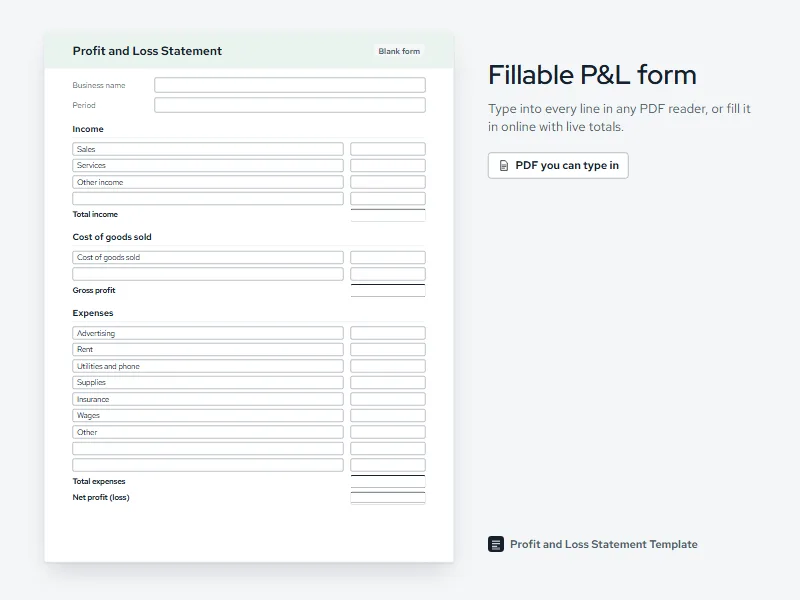
The blank PDF starts with the same line names as the form above and adds spare lines in each section, with a field for every label and amount. It is two Letter pages: the figures on the first, then notes, signature and date on the second. Type into it in a reader that supports form fields, or print it and write on it. It has no calculations inside, so you work out the totals yourself. The Excel and Word files use our shorter simple layout, without cost of goods sold. For other layouts, from monthly to self-employed, see the profit and loss statement template page.
How to use the form
Add your business name and dates
Type your business name, then the first and last day the statement covers.
Enter each line
Rename any line to match your business and type its amount. Add lines with the add buttons, or remove the ones you do not need.
Check the totals
Total income, gross profit, total expenses and net profit update as you type. A loss shows in parentheses.
Choose flattened or fillable
Flattened turns the boxes into plain text for sending. Fillable keeps every field editable.
Download or print
The PDF is made on your device. Nothing you type is sent anywhere.
If eight lines are all you need, the simple profit and loss statement template fits on one page in Excel and Word too.
What the filled PDF includes
The PDF follows the form line for line: the business name, the period and who prepared it at the top, then income, cost of goods sold with gross profit, expenses, and net profit with a double rule under it. Below the figures there is a notes box, then boxes for a signature and a date. A short line at the foot of each page says the statement is not accounting, tax or legal advice.
Lines you leave without an amount still print their names, but the totals are printed from the amounts you typed. To write every figure by hand, use the blank PDF instead, where the totals are empty too. A long statement continues onto more pages rather than shrinking the type: 10 lines in each section takes two pages, and the limit of 30 takes three.
Flattened or fillable
A flattened PDF has the figures printed into the page, with no boxes to click into and change. That suits a statement you send to a lender, a landlord or an agency. It is not a security lock, because PDF editing software can still alter the page.
A fillable PDF keeps every label and amount as a form field. Choose it when you expect to come back and change something, such as adding the last few days of a month. If a lender asked for a YTD profit and loss statement, fill it in here for January 1 to your end date, then download it flattened, sign it and date it.
Questions
Is this profit and loss statement PDF fillable?
Yes. Download the blank copy and type into it in any reader that supports form fields. Or fill in the form on this page, where the totals add up as you type, and download a filled copy. Choose flattened to turn the boxes into plain text, or fillable to keep editing later.
Can I print a blank profit and loss statement and fill it in by hand?
Yes. Download the blank PDF and print it without typing anything. The common line names, such as Sales, Rent and Supplies, are already on it, with empty boxes for the amounts and spare lines for your own items. It prints on two Letter pages: the figures on the first, then notes, signature and date on the second. You add up the totals yourself.
Do I need special software to fill in the PDF?
You need a reader that can fill in form fields, such as the free Adobe Acrobat Reader or the viewer built into Firefox. If yours cannot type into the boxes, fill in the form on this page instead: it runs in your browser and gives you a finished file to save or print.
Will the blank PDF add up my totals?
No. The blank PDF has no calculations inside it, so you type each total yourself. If you want the math done for you, fill in the form on this page: total income, gross profit, total expenses and net profit update as you type, and the PDF you download carries the finished totals.
What if I need more lines than the form has?
Add lines with the add buttons, up to 30 in each section. If you still need more, combine small items into an Other line, or move to a spreadsheet, where you can insert as many rows as you like. Our profit and loss statement examples show how other businesses group their lines.
Is what I type into the form saved anywhere?
No. The form runs in your browser and the PDF is made on your device, so nothing you type is sent to us or stored on a server. Because the site keeps no copy, closing or reloading the page can lose what you typed, so download or print your statement before you leave.
Can I sign the PDF after I download it?
Yes. The PDF has a box for a signature and one for the date. Print it and sign by hand, or type your name in the fillable version, where the signature box is an ordinary text field. Ask your lender whether a typed, drawn or handwritten signature is fine before you send it.