Profit and Loss Statement PDF (Fillable)
Fill it in here with live totals, then download a filled PDF. Or take the blank fillable PDF.
Not accounting, tax or legal advice. Check every figure before you sign or submit it. Some lenders require a statement prepared by an accountant.
Flattened is best for sending. Fillable lets you change figures in a PDF reader.
Download a blank fillable PDF
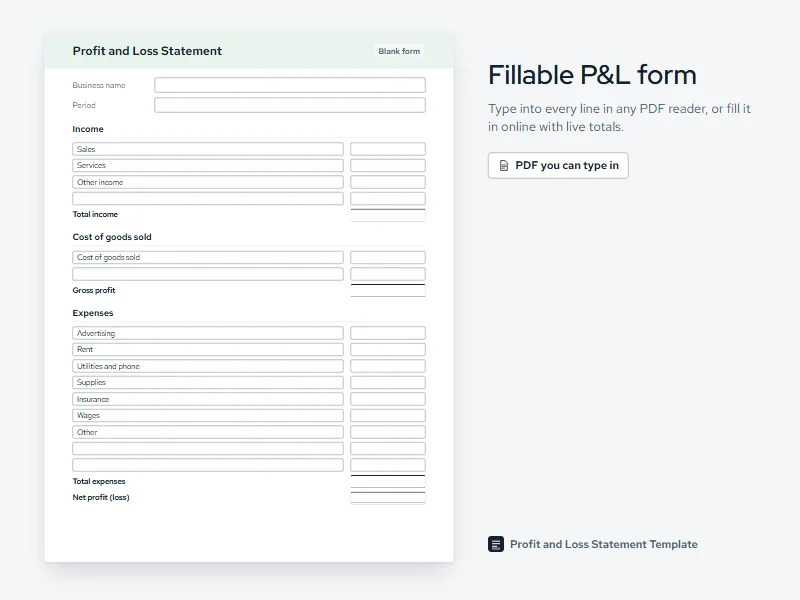
The blank PDF has the same lines as the form above, with a field for every label and amount, so you can fill it in any PDF reader and print it. It has no calculations inside, so you type the totals yourself. For other layouts, from monthly to self-employed, see the profit and loss statement template page.
How to use the form
Add your business name and dates
Type the name the way it appears on your bank account, then the first and last day the statement covers.
Enter each line
Rename any line to match your business and type its amount. Add lines with the add buttons, or remove the ones you do not need.
Check the totals
Total income, gross profit, total expenses and net profit update as you type. A loss shows in parentheses.
Choose flattened or fillable
Flattened locks the figures for sending. Fillable keeps every field editable.
Download or print
The PDF is made on your device. Nothing you type is sent anywhere.
If eight lines are all you need, the simple profit and loss statement template fits on one page in Excel and Word too.
What the filled PDF includes
The PDF follows the form line for line: the business name, the period and who prepared it at the top, then income, cost of goods sold with gross profit, expenses, and net profit with a double rule under it. Below the figures there is a notes box and lines for a signature and a date, so a lender or landlord can see who stands behind the numbers. A short line at the foot of the page says the statement is not accounting, tax or legal advice.
Lines you leave without an amount still print their names, so you can fill them in by hand. A statement with a lot of lines simply continues onto a second page rather than shrinking the type.
Flattened or fillable
A flattened PDF has the figures printed into the page, like a scan of a paper form. Nobody can change a number by clicking into it, which is what you want when you send a statement to a lender, a landlord or an agency. It also looks the same in every PDF reader.
A fillable PDF keeps every label and amount as a form field. Choose it when you expect to come back and change something, such as adding the last few days of a month. If a lender asked for a YTD profit and loss statement, fill it in here for January 1 to your end date, then download it flattened, sign it and date it.
Questions
Is this profit and loss statement PDF fillable?
Yes. You can download the blank fillable PDF and type into it in any PDF reader that supports form fields. Or fill in the form on this page, where the totals add up as you type, and download a filled copy. Choose flattened to lock the figures, or fillable to keep editing later.
Do I need special software to fill in the PDF?
No. Most free PDF readers, and the PDF viewers built into most browsers, can fill in form fields, so you only need one of those. If your reader cannot type into the fields, fill in the form on this page instead: it runs in your browser and gives you a finished PDF to save or print.
Will the blank PDF add up my totals?
No. The blank PDF has no calculations inside it, so you type each total yourself. If you want the math done for you, fill in the form on this page: total income, gross profit, total expenses and net profit update as you type, and the PDF you download carries the finished totals.
What if I need more lines than the form has?
Add lines with the add buttons, up to 30 in each section. If you still need more, combine small items into an Other line, or move to a spreadsheet, where you can insert as many rows as you like. Our profit and loss statement examples show how other businesses group their lines.
Is what I type into the form saved anywhere?
No. The form runs in your browser and the PDF is made on your device, so nothing you type is sent to us or stored on a server. If you close or reload the page, the form starts empty again, so download or print your statement before you leave.
Can I sign the PDF after I download it?
Yes. The PDF has lines for a signature, the date and your name and title. Print it and sign by hand, or sign the fillable version in a PDF reader that supports signatures. Lenders differ on what they accept, so ask yours whether a typed, drawn or handwritten signature is fine before you send it.